

Better-Connected Business Systems | NexivaGen
Your Business Doesn't Need More Tools. It Needs Better-Connected Systems.
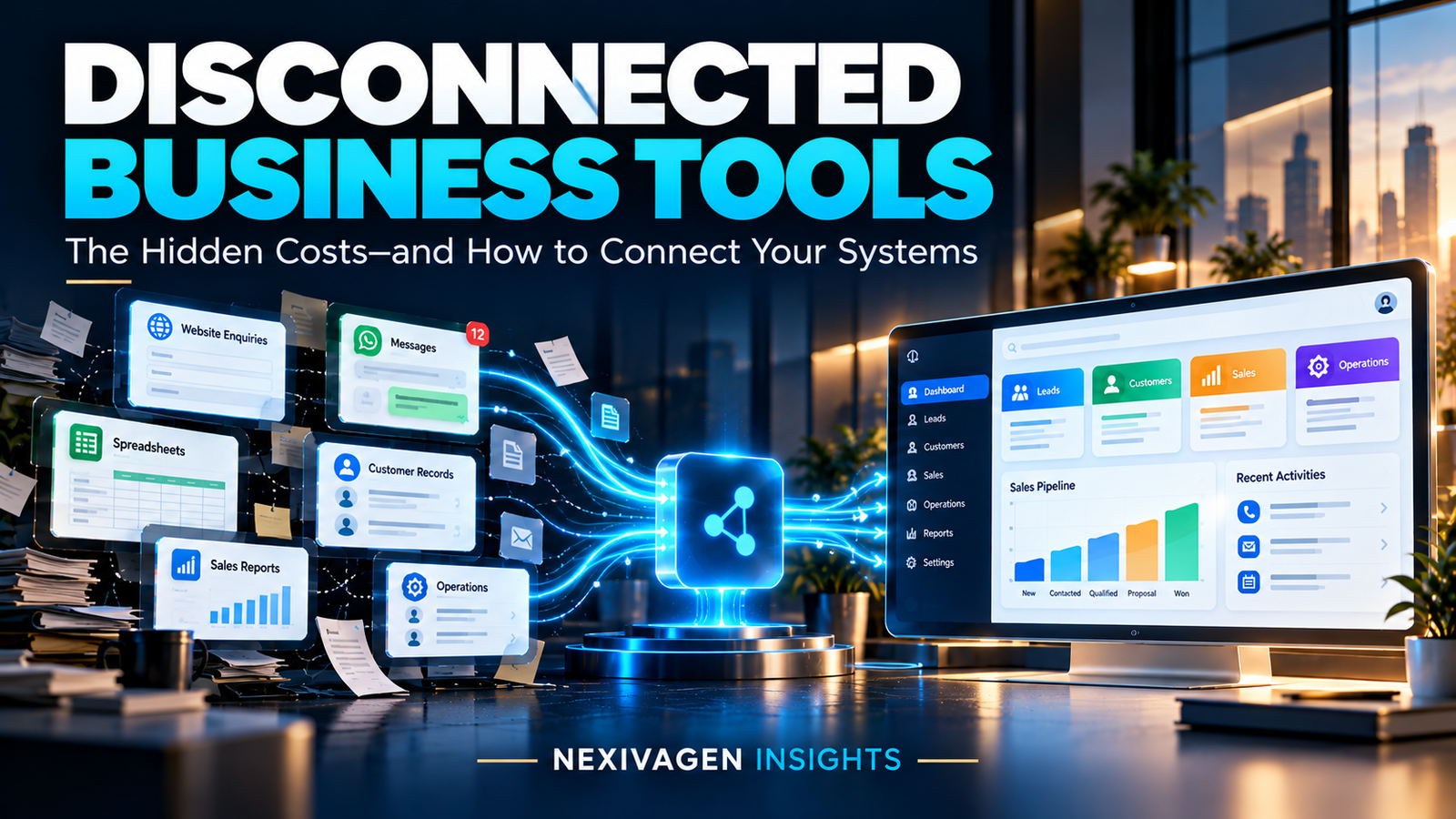
Modern businesses use technology for almost everything. Websites generate enquiries, messaging applications support customer communication, spreadsheets track information, accounting software manages finances, and CRM systems help sales teams organize opportunities.
Yet, despite using all these tools, many businesses still struggle with the same problems.
Customer information is scattered across different platforms. Employees repeatedly enter the same data. Sales teams miss follow-ups. Managers spend hours preparing reports. Different departments work with different versions of the same information.
The problem is not necessarily a lack of technology. Sometimes, it is the lack of connection between the technologies a business already uses.
Your business may not need another software tool. It may need a smarter way for its existing systems to work together.
Business systems integration, workflow automation and carefully selected digital solutions can help organizations improve visibility, reduce repetitive work and manage operations more effectively.
In this guide, we explore the challenges of disconnected business systems, practical ways to address them, and how to decide which technology improvements make sense for your business.
1. The Hidden Cost of Disconnected Business Systems
Consider a growing company that receives customer enquiries through its website, WhatsApp, email and telephone.
The sales team records some enquiries in a spreadsheet. Other conversations remain in messaging applications. Follow-up reminders are maintained manually, while customer information is entered into a separate system after a deal closes.
Each tool may perform its individual function well. However, the overall process can become difficult to manage because information does not flow smoothly between them.
This situation creates operational friction.
Employees spend time searching for information instead of acting on it. Managers struggle to understand the current status of opportunities. Customers may need to repeat information they have already provided.
As the business grows, these problems can become more noticeable.
Disconnected systems may contribute to:
-
Repeated data entry and unnecessary administrative work.
-
Delayed customer responses and inconsistent follow-ups.
-
Incomplete or outdated customer records.
-
Limited visibility into sales and operational performance.
-
Reporting errors caused by inconsistent information.
-
Difficulty coordinating work between departments.
-
Increasing dependence on individual employees who understand undocumented processes.
These issues do not automatically mean that a business needs expensive enterprise software. Often, the first step is to understand where information becomes disconnected and why.
2. Seven Signs Your Business Systems Need Better Integration
How can you determine whether disconnected processes are affecting your business? Start by reviewing these seven common warning signs.
Sign 1: Customer enquiries are scattered across multiple channels
Potential customers may contact your business through a website form, WhatsApp, email, social media or a telephone call.
If these enquiries are managed separately, employees may struggle to identify which conversations require attention and which customers are waiting for a response.
A centralized lead management process can help bring enquiry details, ownership, status and follow-up activities into one organized workflow.
Sign 2: Employees repeatedly enter the same information
When two or more systems do not exchange relevant information, employees may need to copy customer details, order information or transaction records manually.
Repeated data entry consumes time and creates opportunities for mistakes.
Appropriate system integration can transfer selected information automatically, reducing duplication and helping teams maintain more consistent records.
Sign 3: Follow-ups depend on memory
A salesperson may remember to call an important prospect today but forget another follow-up scheduled for the same afternoon.
As the number of leads increases, relying entirely on memory becomes difficult.
A CRM system can help assign responsibilities, record communication history, schedule reminders and display the current stage of each opportunity.
Automation can support this process by triggering reminders or predefined actions when specific conditions are met.
Sign 4: Different departments maintain different records
Sales, finance, operations and customer support may each maintain their own spreadsheets or software records.
When these records do not match, employees can spend valuable time checking which information is correct.
An integrated workflow should establish which system owns each important record and how relevant updates are shared with other systems.
The goal is not necessarily to store everything in one application. It is to make the right information available to the right people.
Sign 5: Management reports take too long to prepare
If managers must collect data from multiple spreadsheets, applications and departments before reviewing performance, reporting can become a time-consuming exercise.
A connected reporting process can bring relevant information together and reduce the need for repeated manual compilation.
The result is a clearer view of important measures, such as enquiry volume, sales pipeline status, pending tasks, order progress and operational workload.
Sign 6: Business growth creates more administrative work
A business may handle its current workload through manual processes when it has only a few employees and customers.
As order volumes, customer enquiries and internal responsibilities increase, the same processes may become harder to maintain.
Reviewing workflows before problems become severe can help businesses identify which activities should be standardized, automated or supported by better software.
Sign 7: Employees depend on informal workarounds
If employees constantly exchange files, maintain private spreadsheets or use personal reminders to complete routine work, the official process may not support their actual needs.
These workarounds are valuable signals. They reveal where the existing system fails to support the way the business operates.
Instead of immediately replacing the software, investigate why employees need those workarounds and whether a better workflow or integration could resolve the problem.
3. Why Adding More Software Doesn't Always Solve the Problem
When a business encounters an operational challenge, purchasing another application can appear to be the quickest solution.
A new CRM may help organize leads. A project management platform may improve task tracking. An accounting tool may simplify financial records.
However, introducing another tool without reviewing the overall process can create additional complexity.
Employees may need to switch between even more applications. Information may become duplicated. Subscription costs may increase, while the original problem remains unresolved.
Before choosing new software, ask four questions:
-
What specific business problem are we trying to solve?
-
Which information needs to move between systems?
-
Can our existing software support the required workflow through configuration or integration?
-
What measurable improvement would justify the investment?
Sometimes, better configuration is enough. In other cases, an integration, a CRM, an ERP system or customized software may be appropriate.
The best solution is the one that addresses the actual business requirement—not simply the one with the longest feature list.
4. How Business Systems Integration Works
Business systems integration connects applications, databases or operational processes so that relevant information can move between them according to defined rules.
For example, imagine an online retailer that receives orders through its website.
Without integration, an employee may need to copy each order into another system, update inventory separately and manually communicate order information to the team responsible for fulfilment.
With an appropriately designed integration, an order can trigger the transfer of selected information to inventory, accounting or fulfilment software.
The precise workflow depends on the applications, available integrations, business rules and data requirements.
A practical integration process generally includes five stages:
Stage 1: Identify the source of information. Determine where each important record originates, such as a website form, order management system or CRM.
Stage 2: Define the destination. Identify which application or team needs that information.
Stage 3: Establish business rules. Decide what should happen when a record is created, updated, cancelled or found to contain incomplete information.
Stage 4: Connect the systems. Use available APIs, built-in connectors, middleware or a suitable custom integration.
Stage 5: Test and monitor. Check data accuracy, access permissions, error handling and the reliability of information transfer.
Good integration is not simply about moving data. It is about making information useful within a clearly defined business process.
5. Website, WhatsApp and CRM: Connecting the Customer Journey
For businesses that generate enquiries online, one of the most useful starting points is connecting customer acquisition with lead management.
A website can attract visitors and collect enquiries. Messaging channels can support conversations. A CRM can organize customer records, sales activities and follow-ups.
When these activities operate independently, potential customers may experience inconsistent communication.
A connected process could work as follows:
-
A prospective customer submits an enquiry through a website form.
-
The enquiry details are captured in the appropriate lead management system.
-
The lead is assigned to a responsible team member.
-
A notification or reminder helps the team respond promptly.
-
Relevant customer interactions are recorded according to the workflow.
-
The sales team updates the opportunity's status.
-
Managers review pipeline activity and identify where follow-ups are needed.
WhatsApp integration may be possible through supported business messaging tools or APIs, depending on the setup. It should not be assumed that every personal WhatsApp account can be connected to every CRM.
This process can help businesses maintain more organized records and improve follow-up consistency. Actual results depend on the quality of the workflow, employee adoption and the way enquiries are handled.
6. CRM vs ERP vs Custom Software: What Does Your Business Need?
Different business challenges require different solutions. Understanding the purpose of each option helps avoid unnecessary spending.
Customer Relationship Management (CRM)
A CRM system primarily supports customer relationships and sales activities.
It can help businesses organize leads, track conversations, manage sales opportunities, schedule follow-ups and maintain customer information.
Consider CRM when: Your team struggles to track enquiries, coordinate sales activities or maintain consistent customer records.
Enterprise Resource Planning (ERP)
An ERP system connects important internal business functions, depending on the product and configuration.
These functions may include inventory, purchasing, finance, production, orders and other operational processes.
Consider ERP when: Your business needs more coordinated operational records and workflows across departments.
Custom Software Development
Custom software is designed around specific business requirements that existing applications may not adequately support.
It may include specialized workflows, internal portals, business dashboards, approval processes or connections between existing systems.
Consider custom software when: Standard applications cannot reasonably support an important requirement, and the expected benefits justify development and maintenance costs.
System integration
Integration connects systems that need to exchange information or trigger actions.
Consider integration when: Your existing applications are useful individually but require excessive manual work to share information.
These options are not mutually exclusive. A business might use an existing CRM, an accounting platform and a custom integration without replacing its entire technology stack.
7. Which Business Processes Should You Automate First?
Automation can improve repetitive processes, but automating a poorly defined workflow may simply make the problem happen faster.
Start with activities that are repetitive, reasonably predictable and important enough to justify improvement.
Potential starting points include:
-
Lead assignment and follow-up reminders.
-
Notifications when new website enquiries arrive.
-
Customer onboarding and document collection.
-
Internal task assignment and approval notifications.
-
Order status updates.
-
Data synchronization between compatible systems.
-
Scheduled operational reports.
-
Appointment reminders and service requests.
Before implementing automation, document the existing process and identify exceptions.
For example, a lead notification workflow should account for incomplete enquiry details, duplicate submissions and cases where no team member is available.
Also define who monitors failures and how employees can correct errors.
A useful principle is to standardize the process first, automate the appropriate steps second, and measure the outcome afterward.
8. A Practical Business Systems Audit Checklist
You do not need to begin with a large technology project. Start by reviewing how work actually moves through your organization.
Use this checklist to identify potential improvements.
-
We know which applications are used by each department.
-
Customer and operational information has a clearly defined source of truth.
-
Website enquiries have an assigned owner and follow-up process.
-
Employees do not repeatedly enter the same information without a good reason.
-
Important tasks have clear responsibilities and deadlines.
-
Managers can access the operational information needed for decisions.
-
Systems have appropriate access permissions and security controls.
-
Data backups and recovery procedures are documented where required.
-
Integration failures can be identified and corrected.
-
We review whether software costs and features match actual business needs.
Choose the two or three gaps that create the most significant operational difficulty.
Estimate how frequently the problem occurs, how much employee time it consumes, and what happens when the process fails. This gives you a more practical basis for deciding what to improve first.
9. How to Measure Whether Connected Systems Are Working
Technology implementation should be evaluated against business outcomes rather than the number of applications installed.
Useful measures include:
Time spent on manual work: Estimate how much time employees spend on repetitive data entry, reporting and administrative activities.
Lead response and follow-up: Track response times, follow-up completion and the number of enquiries without an assigned owner.
Data quality: Monitor duplicate records, missing information and inconsistencies between connected systems.
Process completion: Measure delays, pending approvals and the time required to complete important workflows.
Business costs: Review software subscriptions, maintenance, integration costs and the resources required to operate the process.
Customer experience: Where appropriate, collect feedback on response consistency, service communication and the ease of completing customer journeys.
Record a baseline before implementing a change, then compare results over a reasonable period.
Not every improvement will translate immediately into higher revenue. However, reliable measurements help businesses determine whether the new process is delivering sufficient value to continue or expand.
10. Build a Better-Connected Business Without Overspending
For small and growing businesses, the right approach is often gradual rather than transformational all at once.
Begin with one important workflow. Document how it currently operates, identify the main points of friction and define the outcome you want to achieve.
Next, review the tools already available. An existing application may support the required feature, or a relatively small integration may eliminate unnecessary manual work.
If a new CRM, ERP system or custom application is necessary, compare options based on functionality, implementation effort, data security, scalability, support and total cost of ownership.
Consider how the solution will fit into employees' daily work. Even a technically capable system can deliver limited value if it is difficult to use or poorly aligned with the team's process.
Finally, test the workflow with a small group, gather feedback and make adjustments before expanding it.
This approach helps businesses make informed technology decisions while avoiding unnecessary complexity.
Conclusion: Make Your Business Technology Work Together
Business growth brings new customers, more information and additional operational responsibilities. When every department uses disconnected tools and manual workarounds, managing that growth can become increasingly difficult.
The answer is not always another application or a complete software replacement.
Sometimes, the most valuable improvement is connecting the systems you already use, simplifying a workflow or automating a repetitive task.
Start by identifying where information gets lost, where employees repeat work and where managers lack visibility. Then select a solution that addresses those specific problems and measure whether it makes a meaningful difference.
At NexivaGen Technologies, we believe technology should solve real business challenges. Our areas of work include website development, web applications, CRM development, ERP solutions, customized software development and business process automation.
If your business is evaluating how to improve its digital workflows, begin with the problem—not the product.
Explore the right digital solution for your business at https://nexivatechnologies.in/.
Your business doesn't necessarily need more tools. It needs the right systems, connected in the right way.
Frequently Asked Questions (FAQs)
1. What is business systems integration?
Business systems integration connects applications, databases or workflows so relevant information can move between them. It can reduce manual data transfer, improve information consistency and support more coordinated business processes.
2. Why do small businesses need business process automation?
Business process automation can help small businesses reduce repetitive work, standardize routine tasks and manage activities more consistently. Suitable use cases include lead notifications, task reminders, document workflows and data synchronization.
3. What is the difference between CRM and ERP software?
CRM software focuses primarily on customer relationships, sales activities and lead management. ERP software helps coordinate internal business functions such as inventory, purchasing, finance and operations. The right choice depends on the organization's requirements.
4. Can a website be connected to a CRM system?
Yes. A website can often send enquiry information to a CRM through supported integrations, APIs or connectors. The implementation should account for data validation, duplicate enquiries, permissions and error handling.
5. Is custom software better than ready-made software?
Not necessarily. Ready-made software is often suitable when its features match your requirements. Custom software may be appropriate when important workflows cannot be supported effectively by existing products. Compare the full cost, flexibility, maintenance and expected business value before deciding.
6. How can businesses reduce manual data entry?
Businesses can review duplicate processes, standardize data collection and integrate compatible systems. Automation can transfer information between applications, but the workflow should be tested to ensure data remains accurate and exceptions are handled correctly.
7. How much does business software integration cost?
Costs vary according to the applications involved, the complexity of the workflow, API availability, data migration requirements, security needs and ongoing maintenance. A clearly defined scope helps businesses obtain a more meaningful estimate.
8. How should a business start its digital transformation?
Start by identifying a significant operational problem, documenting the current workflow and defining a measurable improvement. Review existing tools before purchasing new software, implement a manageable change and expand based on the results.
9. Is business automation suitable for every industry?
Many industries can benefit from suitable automation, including manufacturing, education, healthcare, ecommerce, logistics, real estate and professional services. However, the appropriate workflow, compliance requirements and implementation approach differ by industry.
10. How can NexivaGen Technologies help businesses?
NexivaGen Technologies works across website development, web applications, CRM development, ERP solutions, customized software development and business process automation. Businesses can explore its services at https://nexivatechnologies.in/ and identify which digital solutions align with their requirements.