

ERP vs CRM: Which Solution Is Right for Your Business?
As businesses grow, managing operations through spreadsheets, disconnected applications, emails, and manual processes becomes increasingly difficult.
Sales teams need better customer visibility. Finance teams need accurate financial information. Operations teams need better coordination. Management needs reliable data for decision-making.
At this point, many businesses begin evaluating ERP vs CRM.
But ERP and CRM are not simply two competing software products. They solve different business problems.
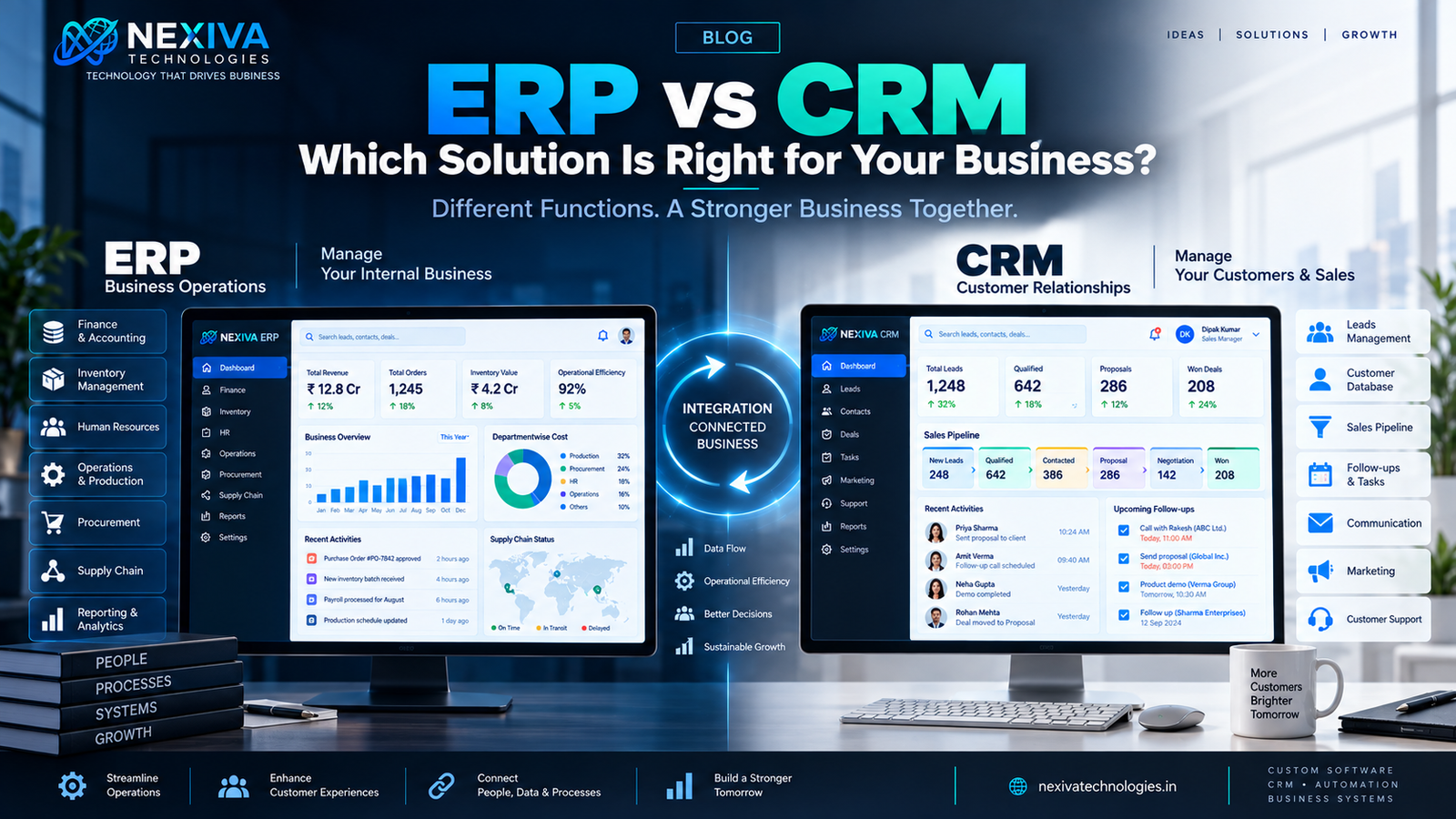
An ERP (Enterprise Resource Planning) system is primarily designed to connect and manage internal business processes such as finance, inventory, procurement, HR, production, and operations.
A CRM (Customer Relationship Management) system focuses primarily on customers, prospects, sales activities, marketing, communication, and relationship management.
Choosing between them—or deciding whether you need both—depends on your business model, current challenges, growth stage, and operational requirements.
This guide explains the difference between ERP and CRM, their features, benefits, use cases, integration possibilities, and how businesses can determine which solution is right for them.
Quick Answer: ERP vs CRM
ERP manages internal business operations, while CRM manages customer relationships and sales activities.
An ERP is generally more suitable when a business needs to centralize areas such as finance, inventory, procurement, HR, production, and operations.
A CRM is generally more suitable when the primary challenge involves lead management, sales pipelines, customer communication, marketing, and customer retention.
For growing businesses, ERP and CRM can also work together, creating a connected system where customer, sales, financial, and operational data can move between departments.
The right choice depends on what problem your business is trying to solve first.
What Is ERP?
ERP (Enterprise Resource Planning) is business management software designed to connect multiple organizational functions within a centralized system.
Instead of maintaining separate systems for different departments, an ERP can bring important business processes together.
Depending on the organization's requirements, an ERP may include:
- Finance and accounting
- Inventory management
- Procurement
- Sales
- Purchasing
- Human resources
- Payroll
- Production
- Supply chain
- Project management
- Reporting and analytics
The main objective of ERP development is to create better coordination between departments and provide management with centralized business information.
Example
Imagine a manufacturing company receives a new order.
An integrated ERP could connect the process across:
Sales → Inventory → Procurement → Production → Finance → Delivery
Instead of every department maintaining separate information, the organization can work from connected business data.
What Is CRM?
CRM (Customer Relationship Management) software is designed to help businesses manage interactions and relationships with prospects and customers.
A CRM typically focuses on the customer journey.
Common CRM functions include:
- Lead management
- Contact management
- Sales pipeline
- Follow-ups
- Customer communication
- Email management
- Sales forecasting
- Marketing automation
- Customer support
- Reports and analytics
For example, when a potential customer submits an enquiry, a CRM can help the sales team record the lead, assign it to a salesperson, schedule follow-ups, track communication, and eventually record the outcome.
The primary objective is to help businesses attract, convert, and retain customers more effectively.
ERP vs CRM: Comparison Table
| Feature | ERP | CRM |
|---|---|---|
| Primary purpose | Manage business operations | Manage customer relationships |
| Main focus | Internal processes | Customers and sales |
| Finance | Strong | Usually limited |
| Inventory | Strong | Usually limited |
| Procurement | Strong | Limited |
| HR | Often included | Usually not core |
| Production | Often supported | Not usually core |
| Lead management | Secondary | Core function |
| Sales pipeline | Available in some ERP systems | Core function |
| Customer communication | Limited/varies | Strong |
| Marketing | Limited/varies | Strong |
| Operational reporting | Strong | Sales/customer focused |
| Customer retention | Indirect | Direct focus |
| Best for | Operational integration | Sales and customer management |
The distinction is important: ERP is primarily business-operation focused, while CRM is primarily customer focused.
Key Features of an ERP System
A modern ERP can contain multiple modules depending on the business.
Finance & Accounting
Manage financial transactions, invoices, expenses, accounts, and financial reporting.
Inventory Management
Track stock levels, products, warehouses, movements, and inventory requirements.
Procurement
Manage suppliers, purchase orders, approvals, and procurement workflows.
Human Resources
Manage employee records, attendance, leave, payroll-related workflows, and HR processes.
Production Management
Manufacturing businesses can manage production planning, materials, workflows, and related operational processes.
Business Reporting
Management can access centralized information for operational analysis and decision-making.
Key Features of a CRM System
CRM software is generally centered around customer acquisition and relationship management.
Lead Management
Capture, categorize, assign, and track leads.
Contact Management
Maintain centralized customer and prospect information.
Sales Pipeline
Track opportunities from initial enquiry through conversion.
Follow-Up Management
Schedule and monitor sales activities.
Customer Communication
Maintain records of interactions with prospects and customers.
Marketing Support
Segment audiences and support targeted marketing workflows.
Sales Analytics
Monitor conversion rates, pipeline value, sales performance, and other relevant metrics.
Benefits of ERP
1. Centralized Business Data
An ERP can reduce information silos by bringing business functions into a connected environment.
2. Improved Operational Efficiency
Automating repetitive workflows can reduce manual administrative work.
3. Better Management Visibility
Decision-makers can access information across multiple departments.
4. Reduced Data Duplication
Centralized systems can reduce the need for multiple teams to maintain the same information separately.
5. Process Standardization
ERP systems can help organizations establish consistent workflows.
6. Scalability
A properly designed ERP can expand as business operations become more complex.
Benefits of CRM
1. Better Lead Management
Sales teams can manage prospects more systematically.
2. Improved Follow-Ups
CRM workflows can help prevent opportunities from being forgotten.
3. Greater Customer Visibility
Sales teams can understand previous interactions and customer requirements.
4. Improved Sales Productivity
Automating administrative tasks allows sales teams to spend more time on selling.
5. Better Customer Retention
Businesses can maintain better records of customer relationships and engagement.
6. Data-Driven Sales Decisions
Sales managers can monitor pipeline performance and identify opportunities for improvement.
ERP Use Cases
ERP systems can be especially valuable for businesses with complex internal operations.
Manufacturing
Production, procurement, inventory, finance, and supply chain coordination.
Retail
Inventory, purchasing, sales, finance, and warehouse management.
Distribution
Orders, stock, procurement, logistics, and financial operations.
Large Service Businesses
Projects, employees, billing, finance, and operational workflows.
Growing Enterprises
Businesses managing multiple departments and increasingly complex processes.
CRM Use Cases
CRM solutions are especially useful for businesses where customer acquisition and relationship management are central.
Sales Teams
Lead tracking, pipeline management, follow-ups, and sales reporting.
Marketing Teams
Customer segmentation, campaign management, and lead nurturing.
Real Estate
Property enquiries, prospects, follow-ups, and customer communication.
Travel & Hospitality
Customer enquiries, bookings, communication, and relationship management.
Professional Services
Managing prospects, clients, opportunities, and ongoing communication.
B2B Companies
Managing longer sales cycles and multiple interactions with decision-makers.
Can ERP and CRM Work Together?
Yes. In many growing organizations, ERP and CRM work better together than separately.
Consider a customer purchasing from a company.
The CRM can manage:
Lead → Opportunity → Sales Conversation → Customer
The ERP can manage:
Order → Inventory → Invoice → Payment → Fulfillment
When these systems are integrated, information can move between customer-facing and operational teams.
For example:
CRM: Customer places an order.
↓
ERP: Order information is received.
↓
Inventory: Product availability is checked.
↓
Finance: Invoice is generated.
↓
ERP: Payment status is updated.
↓
CRM: Customer record reflects the transaction.
This creates a more connected business environment.
ERP + CRM Integration
ERP and CRM integration can help remove information silos.
Potentially shared information includes:
- Customer information
- Orders
- Invoices
- Products
- Pricing
- Payment status
- Sales information
- Customer history
The exact integration depends on the platforms and business requirements.
Businesses may connect systems through:
- APIs
- Middleware
- Custom integrations
- Webhooks
- Database integrations
- Cloud services
A proper integration strategy should prioritize security, data consistency, scalability, and reliable synchronization.
ERP vs CRM: Which Should SMEs Choose?
There is no universal answer.
Start with your biggest business problem.
Choose CRM First If:
Your main challenges include:
- Losing leads
- Poor follow-ups
- Disorganized customer information
- Weak sales visibility
- Long sales cycles
- Poor customer communication
- Lack of sales reporting
In this situation, CRM development may provide greater immediate value.
Consider ERP First If:
Your major challenges include:
- Inventory problems
- Finance management
- Procurement complexity
- Multiple departments
- Production management
- Operational inefficiency
- Data silos
- Complex internal workflows
An ERP may be more appropriate.
Consider Both If:
Your business has significant complexity in both:
Customer management + Internal operations
In that case, ERP and CRM integration can create a more complete business technology ecosystem.
ERP vs CRM: A Simple Decision Framework
Ask these five questions:
1. What Is Our Biggest Problem?
Sales/customer management?
Or internal operations?
2. Where Is Data Getting Lost?
Customer information?
Or operational information?
3. Which Teams Need Better Visibility?
Sales and marketing?
Or finance, HR, inventory, and operations?
4. What Will Create the Fastest Business Impact?
Improving lead conversion?
Or improving operational efficiency?
5. What Will We Need in the Future?
Consider your expected growth before selecting a platform.
A solution that works today but cannot support tomorrow's requirements can create additional costs later.
Custom ERP and CRM Development
Off-the-shelf platforms can be useful, but they may not always match unique business processes.
A company may consider custom ERP development or custom CRM development when it requires:
- Unique workflows
- Industry-specific functionality
- Custom dashboards
- Specialized approval systems
- Existing software integration
- Custom reporting
- Business-specific automation
- Scalable architecture
- Greater control over functionality
For example, a business with a unique sales process may need a CRM that doesn't fit neatly into standard software workflows.
Similarly, a manufacturing company with specialized production processes may require an ERP designed around its operational model.
The decision should be based on business requirements rather than choosing custom development simply because it sounds more advanced.
Common Mistakes When Choosing ERP or CRM
Choosing Based Only on Price
The cheapest system may not provide the functionality or scalability you need.
Buying Too Many Features
More features don't automatically mean better business outcomes.
Ignoring Integration
Your software needs to work with the rest of your technology environment.
Poor Employee Adoption
Even excellent software provides limited value if employees don't use it correctly.
No Clear Implementation Plan
Technology implementation should include data, workflows, users, security, testing, training, and support.
Ignoring Future Growth
Choose a solution that can reasonably support your expected business evolution.
Frequently Asked Questions
What is the difference between ERP and CRM?
ERP focuses primarily on managing internal business operations such as finance, inventory, procurement, HR, and production. CRM focuses primarily on customers, leads, sales, communication, and relationships.
Is ERP better than CRM?
Neither is universally better. ERP and CRM solve different business problems. The right choice depends on whether your primary challenge is internal operations or customer and sales management.
Can a small business use ERP?
Yes. An ERP can be useful for SMEs when the business has multiple interconnected operational processes that require centralized management.
Can a small business use CRM?
Yes. CRM is often particularly valuable for SMEs that need better lead management, sales tracking, follow-ups, and customer relationship management.
Can ERP and CRM be integrated?
Yes. ERP and CRM can be integrated using APIs, middleware, custom integrations, or other appropriate technologies. Integration can help connect customer, sales, financial, inventory, and operational information.
Should I choose ERP or CRM first?
Start with the business problem causing the greatest operational or revenue impact. If customer acquisition and sales management are the main challenges, consider CRM first. If internal operations are the primary challenge, ERP may be more appropriate.
When should a business consider custom ERP or CRM development?
Custom development can make sense when standard software cannot adequately support unique workflows, integrations, industry requirements, reporting needs, or scalability requirements.
How Nexiva Technologies Can Help
Choosing between ERP and CRM is ultimately a business and technology decision, not simply a software purchase.
At Nexiva Technologies, we help businesses evaluate and develop technology solutions aligned with their operational requirements and growth objectives.
Our capabilities include:
- ERP Development
- CRM Development
- Custom Software Development
- Web Application Development
- Business Process Automation
- API & System Integration
- Mobile Application Development
- Cloud Solutions
- AI/ML Solutions
- IT Consulting
Whether your organization needs a customized ERP, CRM, integrated business platform, or a combination of technologies, the right architecture should begin with understanding your business processes.
Explore Nexiva Technologies:
https://nexivatechnologies.in/
Discuss Your Requirement:
https://landing.nexivatechnologies.in/
Conclusion
The ERP vs CRM decision should not be treated as a simple competition between two software categories.
ERP and CRM are designed to solve different problems.
ERP connects and manages internal business operations.
CRM connects businesses with their customers and sales opportunities.
For a sales-focused organization, CRM may deliver the most immediate value. For a business dealing with complex finance, inventory, procurement, HR, or production workflows, ERP may be the stronger starting point.
And for organizations with complex customer and operational requirements, integrating ERP + CRM may provide the most comprehensive solution.
The best technology decision is therefore not the one with the longest feature list.
It is the one that solves your most important business problems, fits your processes, supports your people, and gives you room to grow.
Need Help Choosing the Right Business Software?
If you're evaluating ERP development, CRM development, custom software, or business automation, start by defining your current challenges and future requirements.
Nexiva Technologies can help you evaluate the right technology approach and build solutions designed around your business.
Website: https://nexivatechnologies.in/
Get Started: https://landing.nexivatechnologies.in/