

What Is Web Portal Development? Types, Features, Benefits
What Is Web Portal Development? Types, Features, Benefits & Business Use Cases
Businesses today often manage customers, employees, vendors, partners, documents, transactions, and internal processes across multiple systems.
The problem is not always a lack of technology.
The bigger problem is fragmented technology.
When users have to depend on emails, spreadsheets, separate applications, phone calls, shared folders, and disconnected systems to complete routine activities, business operations become harder to manage and scale.
This is where web portal development becomes valuable.
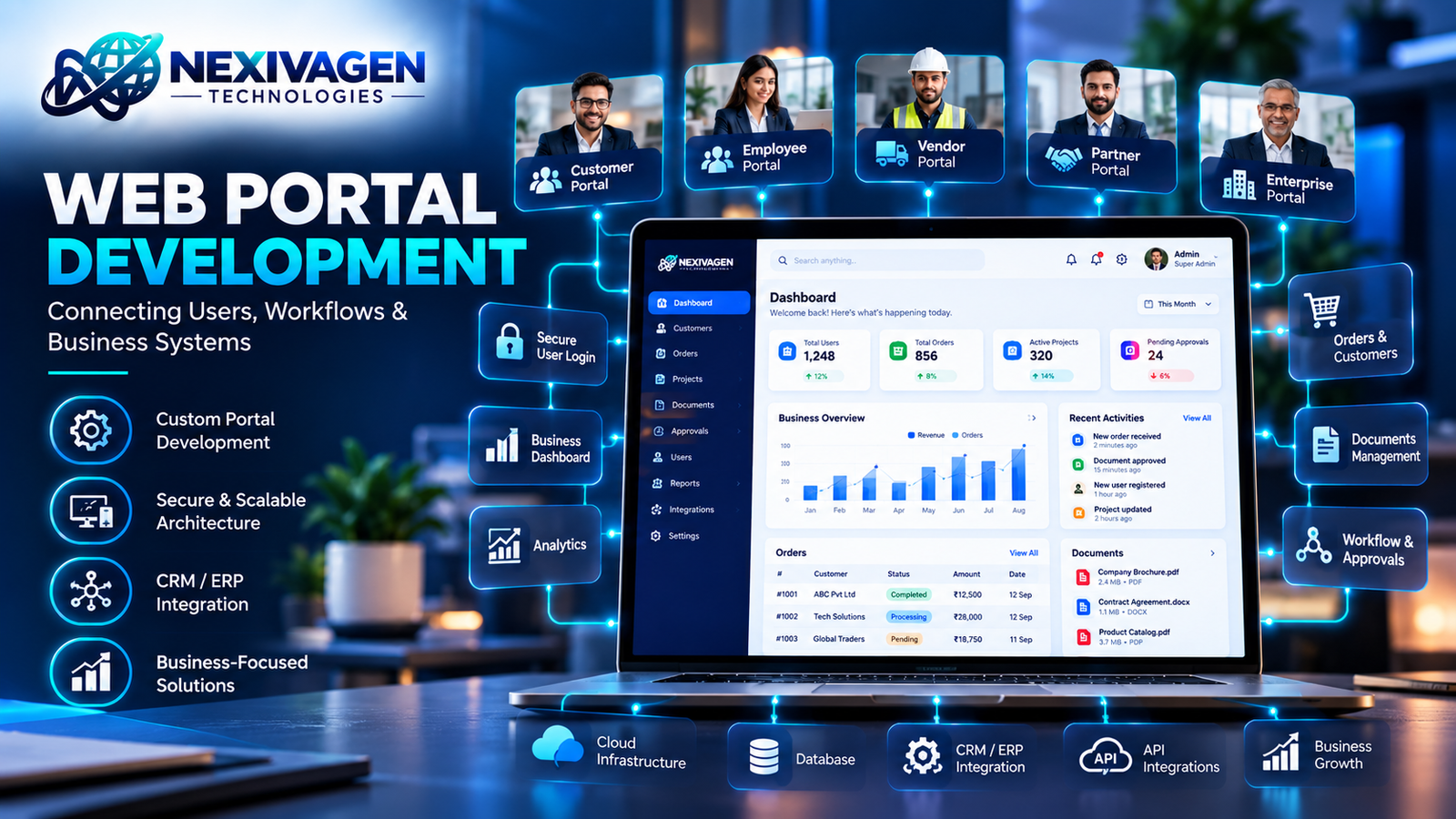
A well-designed web portal brings specific users, information, workflows, services, and business processes together in one secure digital environment.
Quick Answer: What Is Web Portal Development?
Web portal development is the process of designing and developing a secure, user-specific web platform that provides centralized access to information, services, workflows, applications, and business processes.
Unlike a standard business website, a web portal is generally designed for authenticated users and interactive activities such as submitting requests, viewing records, managing documents, communicating with teams, tracking transactions, or accessing personalized information.
Depending on the business requirement, a portal can be built for customers, employees, vendors, partners, distributors, students, patients, or other user groups.
What Is a Web Portal?
A web portal is an interactive online platform that provides users with personalized access to specific information, services, tools, and workflows.
Users typically log in to the portal and see information or functionality relevant to their role.
For example:
- A customer can view orders and download invoices.
- An employee can access HR information and submit leave requests.
- A vendor can update product information and track purchase orders.
- A business partner can access shared documents and sales information.
- A distributor can manage orders and inventory.
- A student can view courses, assignments, payments, and results.
The portal acts as a centralized digital interaction layer between users and the organization.
This makes a custom web portal particularly useful when a business needs functionality beyond what a conventional website or off-the-shelf system can provide.
Website vs Web Portal: What Is the Difference?
A website and a web portal may both operate through a browser, but their purposes are different.
| Website | Web Portal |
|---|---|
| Primarily provides public information | Provides personalized information and services |
| Usually accessible without login | Commonly requires user authentication |
| Designed for broad audiences | Designed for specific user groups |
| Pages are mostly informational | Highly interactive and functional |
| Focuses on visibility and communication | Focuses on workflows and user operations |
| Examples: company site, blog, service site | Examples: customer portal, employee portal, vendor portal |
| Usually simpler workflows | Can contain complex business processes |
| Limited personalization | Role-based and user-specific experiences |
A business website may explain what your company does.
A portal can allow customers, employees, vendors, or partners to actually perform tasks with your business.
That distinction is important when deciding whether you need a website, web application, or custom web portal.
Types of Web Portals
There is no single portal structure that works for every organization.
The right architecture depends on who will use the portal, what information they need, what processes they perform, and which systems the portal must connect with.
Common types include:
- Customer Portal
- Employee Portal
- Vendor Portal
- Partner Portal
- B2B Portal
- Distributor Portal
- Member Portal
- Student or Education Portal
- Patient Portal
- Enterprise Portal
Let's look at the most common business applications.
1. Customer Portal
A customer portal provides customers with secure access to information and services related to their relationship with a business.
Instead of contacting employees for every update, customers can access relevant information themselves.
Common customer portal features
- Customer login
- Profile management
- Order tracking
- Service requests
- Support tickets
- Invoice access
- Payment history
- Document downloads
- Appointment management
- Notifications
- Messaging
- Service status tracking
For example, a software company could provide customers with a portal where they can raise support tickets, monitor project progress, download invoices, view documents, and communicate with the service team.
This can improve transparency while reducing repetitive manual communication.
2. Employee Portal
An employee portal creates a centralized digital environment for internal workforce activities.
Instead of depending on emails and spreadsheets for routine HR and administrative processes, employees can access relevant services through one platform.
Employee portal features may include:
- Employee profiles
- Leave management
- Attendance
- Payroll information
- HR documents
- Company policies
- Internal announcements
- Task management
- Performance information
- Employee requests
- Internal communication
- Approval workflows
An employee portal can also integrate with HRMS, payroll, attendance, ERP, or other internal systems.
3. Vendor Portal
Businesses that work with multiple suppliers and vendors often need structured communication and information exchange.
A vendor portal can provide a centralized environment for supplier-related processes.
Typical features include:
- Vendor registration
- Vendor onboarding
- Product or service information
- Purchase orders
- Order status
- Invoice submission
- Document management
- Compliance documents
- Communication
- Approval workflows
- Payment status
For organizations managing a large vendor ecosystem, this can reduce dependency on scattered emails and manual data entry.
4. Partner Portal
A partner portal is designed for external business partners such as agencies, resellers, distributors, technology partners, or channel partners.
It can provide controlled access to the resources each partner needs.
Examples include:
- Partner registration
- Lead sharing
- Sales information
- Marketing resources
- Product information
- Training materials
- Pricing information
- Deal registration
- Commission information
- Shared documents
- Performance dashboards
Access can be controlled according to partner roles and permissions.
5. B2B Portal
A B2B portal enables businesses to interact digitally with other businesses.
For example, a manufacturer could provide distributors with a portal to check product availability, place orders, track shipments, download invoices, and access product documentation.
A B2B portal can therefore become an important part of a company's digital sales and operations infrastructure.
B2B portal capabilities
- Business account management
- Product catalog
- Bulk ordering
- Pricing by customer
- Order management
- Inventory visibility
- Invoice management
- Payment integration
- Delivery tracking
- Reports
- User roles
- Approval workflows
For organizations with recurring B2B transactions, portal-based workflows can create a more structured customer experience.
Essential Features of a Modern Web Portal
The features of a portal should be determined by business requirements rather than by simply adding as many features as possible.
However, several capabilities are common across modern portal solutions.
User Authentication
Users should be able to securely register, log in, reset passwords, and manage their accounts.
For sensitive platforms, additional authentication mechanisms such as multi-factor authentication may be appropriate.
Role-Based Access Control
Different users should see only the information and functions relevant to them.
For example:
Admin → Full system management
Manager → Approvals and reports
Employee → Personal HR information and requests
Customer → Orders, invoices, and support
Role-based access helps maintain security and simplifies the user experience.
Dashboard
A dashboard gives users an immediate overview of important information.
Depending on the portal, it may display:
- Pending requests
- Recent transactions
- Tasks
- Notifications
- Orders
- Reports
- KPIs
- Account information
Document Management
Portals often require users to upload, view, download, or manage documents.
Examples include:
- Contracts
- Invoices
- Reports
- Certificates
- Agreements
- Identification documents
- Product documents
Notifications
Email, SMS, push, or in-portal notifications can inform users about important activities.
Examples:
- Order updates
- Approval requests
- Payment reminders
- New messages
- Support ticket updates
- Document approvals
Search and Filtering
As portal data grows, users need efficient ways to locate information.
Search, filters, sorting, categories, and pagination can significantly improve usability.
Workflow and Approval Management
Many portals involve processes rather than simple information display.
For example:
Request → Review → Approval → Processing → Completion
A workflow engine can automate these stages and assign activities to the appropriate users.
Security in Web Portal Development
Security should be considered from the beginning of portal architecture rather than added at the end.
A portal may contain customer information, employee records, financial data, business documents, transactions, or confidential company information.
Important security considerations can include:
- Secure authentication
- Authorization
- Role-based permissions
- Password protection
- Secure session management
- HTTPS
- Input validation
- API security
- Database security
- Audit logs
- Backup and recovery
- Monitoring
- Secure file handling
The exact security architecture depends on the portal's users, data, integrations, industry requirements, and risk profile.
For portals handling sensitive information, security requirements should be defined during the discovery and architecture stage.
Integration: Connecting the Portal With Your Business Systems
One of the biggest advantages of a custom web portal is its ability to connect with other business systems.
A portal does not always need to operate as an isolated application.
It can integrate with:
- CRM
- ERP
- HRMS
- Accounting software
- Payment gateways
- Inventory systems
- Shipping platforms
- Email services
- SMS platforms
- Third-party APIs
- Cloud services
- Business intelligence platforms
For example:
Customer Portal → API → CRM → ERP → Payment System
This type of connected architecture can reduce duplicate data entry and create a more consistent flow of information.
For businesses with multiple systems, API development and system integration can therefore become an important component of portal development.
Benefits of Web Portal Development
A well-planned portal can create value across several areas of business operations.
1. Centralized Information
Users can access relevant information from one platform rather than searching through multiple communication channels.
2. Improved Customer Experience
Customers can access services, information, documents, and updates without depending entirely on manual support.
3. Reduced Manual Work
Automated workflows can reduce repetitive administrative activities.
4. Better Data Visibility
Managers can use dashboards and reports to understand business activity more clearly.
5. Improved Collaboration
Employees, customers, vendors, and partners can interact through structured workflows.
6. Scalability
A properly architected portal can evolve as the organization's users, transactions, and requirements increase.
7. Process Automation
Approvals, notifications, requests, assignments, and other repetitive processes can be automated.
8. Better Control
Role-based permissions allow organizations to control who can access particular information and functions.
The actual benefits depend on how well the portal addresses a real business process. Building a portal simply because the technology is available does not automatically create business value.
When Does a Business Need a Custom Web Portal?
A business may want to consider a custom portal when existing tools no longer support its workflows effectively.
Common signs include:
- Employees repeatedly exchange data through spreadsheets.
- Customers frequently request information that could be self-service.
- Vendors send documents through email.
- Teams maintain duplicate records.
- Business processes require too many manual approvals.
- Different systems contain disconnected information.
- Users require role-specific dashboards.
- Management lacks real-time visibility.
- Existing software cannot support required workflows.
- The business needs integrations with multiple systems.
A custom web portal becomes especially relevant when the workflow itself is a competitive or operational differentiator.
Web Portal Development Process
Professional portal development should begin with the business problem rather than the technology.
A typical process includes:
1. Requirement Discovery
Identify:
- Users
- Business objectives
- Workflows
- Data requirements
- User roles
- Integrations
- Security requirements
2. Information Architecture
Define the portal structure, navigation, modules, user journeys, and access levels.
3. UI/UX Design
Create intuitive interfaces for different user roles and devices.
4. Technology Architecture
Define the application architecture, database, APIs, authentication, integrations, hosting, and scalability requirements.
5. Development
Develop the frontend, backend, database, APIs, workflows, dashboards, and integrations.
6. Testing
Test:
- Functionality
- Security
- Performance
- Responsiveness
- User permissions
- API integrations
- Error handling
7. Deployment
Deploy the portal to the selected infrastructure and configure production environments.
8. Maintenance and Improvement
After launch, monitor usage, resolve issues, improve features, and scale the platform according to business needs.
How Much Does Web Portal Development Cost?
There is no single fixed price for web portal development because portal complexity can vary significantly.
The development cost can depend on:
- Number of user types
- Number of modules
- UI/UX complexity
- Custom workflows
- Authentication requirements
- Third-party integrations
- API development
- Database architecture
- Payment functionality
- Reporting and dashboards
- Security requirements
- Mobile responsiveness
- Cloud infrastructure
- Scalability requirements
- Ongoing maintenance
A simple customer portal with authentication and document access will have very different requirements from an enterprise portal connected to ERP, CRM, payment, inventory, and analytics systems.
The right approach is to define the requirements first and then estimate the project based on scope, complexity, integrations, and expected usage.
Web Portal vs Web Application: Are They the Same?
Web portals and web applications can overlap, but they are not necessarily identical.
A web application is generally designed to perform specific interactive functions.
A web portal often acts as a centralized gateway where different users access multiple services, information sources, workflows, or applications.
For example:
Web Application: Online inventory management system
Web Portal: Distributor portal containing inventory, orders, invoices, support, documents, and account management.
In practice, a portal can contain several web applications or modules within a unified user experience.
Frequently Asked Questions
What is web portal development?
Web portal development is the process of creating a secure, interactive web platform that provides specific users with centralized access to information, services, workflows, tools, and business processes.
What is a custom web portal?
A custom web portal is a portal designed and developed around an organization's specific users, workflows, integrations, data requirements, and business objectives rather than relying entirely on a generic platform.
What is a customer portal?
A customer portal is a secure online platform where customers can access information and services such as orders, invoices, support tickets, documents, appointments, and account information.
What is an employee portal?
An employee portal provides employees with centralized access to internal services such as HR information, leave requests, attendance, documents, announcements, tasks, and other organizational resources.
Can a web portal integrate with ERP and CRM systems?
Yes. A web portal can integrate with ERP, CRM, HRMS, accounting, payment, inventory, and other systems through APIs or appropriate integration mechanisms.
Is web portal development suitable for small businesses?
Yes, when a small business has a genuine need for centralized user access, automation, customer self-service, partner management, or specialized workflows. The portal should be proportionate to the business requirement and expected usage.
Is a web portal mobile-friendly?
A modern portal can be designed responsively so users can access it across desktops, tablets, and smartphones. The required experience should be determined during UI/UX planning.
How long does web portal development take?
The timeline depends on the number of modules, user roles, integrations, workflows, design complexity, security requirements, and testing scope. A clear requirements document is necessary for a meaningful project estimate.
Can a web portal be scaled later?
Yes. A properly planned architecture can allow additional users, modules, integrations, workflows, and infrastructure capacity to be introduced as business requirements evolve.
How to Start a Web Portal Development Project
Before starting development, define five things clearly:
1. Who will use the portal?
Customers, employees, vendors, partners, distributors, or multiple user groups?
2. What will they do?
List the actual activities users need to perform.
3. What information will they access?
Define the data, documents, reports, and records required by each role.
4. What systems need to connect?
Identify CRM, ERP, HRMS, payment, accounting, inventory, APIs, and other systems.
5. What should be automated?
Identify repetitive tasks, approvals, notifications, data synchronization, and workflows that can be automated.
This turns a broad portal idea into a practical development roadmap.
Build a Web Portal Around Your Business—not the Other Way Around
A web portal should not simply be another software interface.
It should become a practical digital layer that connects your users, information, workflows, and business systems.
Whether you need a customer portal, employee portal, vendor portal, partner portal, B2B portal, or enterprise portal, the architecture should be designed around the processes the platform is expected to improve.
If your business is currently managing customers, vendors, employees, documents, orders, approvals, or internal workflows across disconnected systems, it may be time to explore a more centralized approach.
Nexiva Technologies helps businesses explore custom web solutions, web application development, business automation, system integration, and technology solutions aligned with their operational requirements.
Explore technology solutions with Nexiva Technologies or explore the company's broader technology and business solutions through NexivaGen Technologies solutions.
Have a portal idea? Start with the business problem, define the users and workflows, and build the technology around the outcome you need.