

ERP Solutions & Business Automation | NexivaGen Technologies
Custom ERP solutions and business automation systems that help businesses manage operations, connect departments, automate workflows and work with better visibility.
One System for Your Business Operations
Connect Your Business With a Smarter ERP System
As businesses grow, information often becomes spread across spreadsheets, separate applications, emails and manual processes.
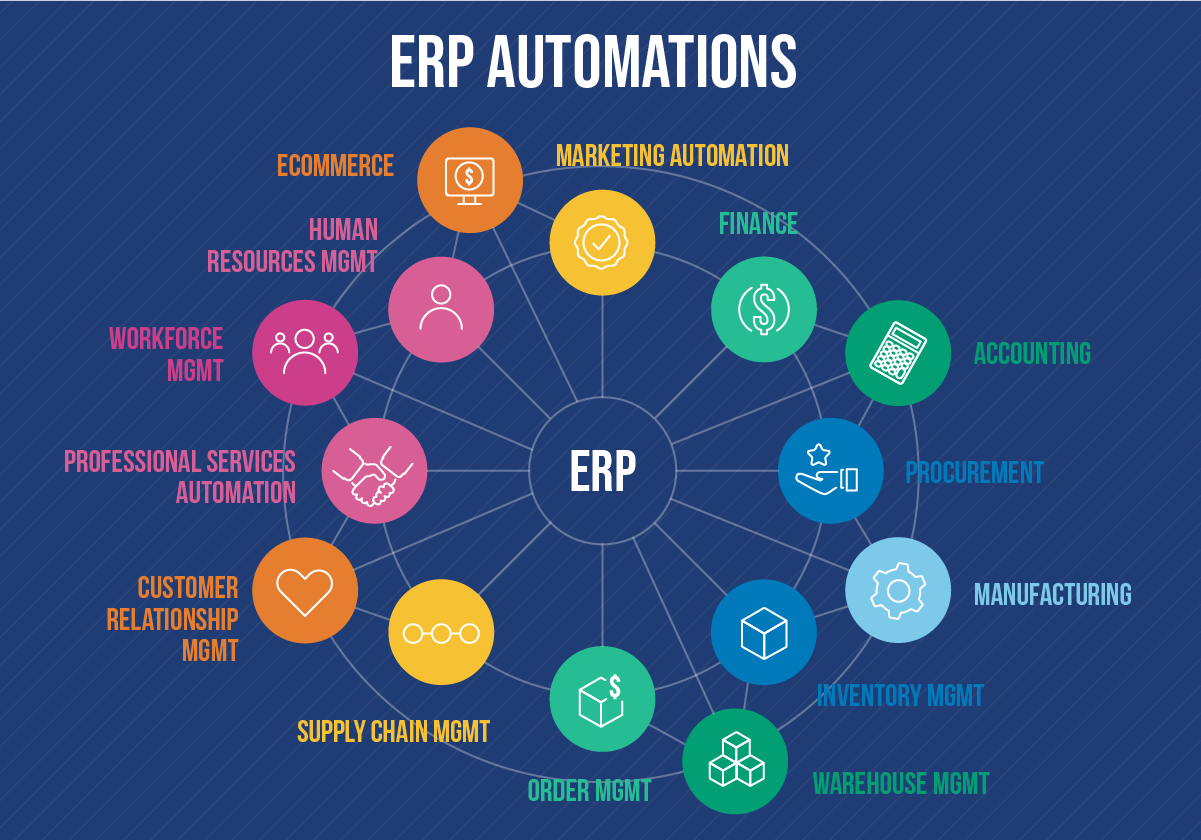
An ERP system can bring these operations together in a connected environment.
With a properly designed ERP solution, your teams can work with shared information, standardized workflows and centralized business data.
We develop ERP solutions around your specific processes rather than forcing your business to completely change the way it operates.
ERP Solutions We Provide
ERP Solutions Designed Around Different Business Needs
Custom ERP Software
Build an ERP system around your company's processes, departments, users and operational requirements.
Inventory & Stock Management
Manage products, stock levels, purchases, warehouses and inventory movements from a centralized system.
Sales & Order Management
Manage enquiries, customers, quotations, sales orders and order-related workflows.
Purchase Management
Digitize purchase requests, suppliers, purchase orders and procurement workflows.
Finance & Business Management
Organize business transactions, billing-related workflows, expenses and financial information according to your operational requirements.
HR & Employee Management
Manage employee information, departments, attendance-related workflows, leave and internal processes.
Manufacturing & Operations
Support production planning, operational workflows, materials and process tracking where required.
CRM & Customer Management
Connect customer information and sales activities with the wider business operation.
Workflow & Approval Management
Create structured approval processes for purchases, expenses, requests, documents and other internal activities.
Reports & Business Dashboards
Bring important business information into dashboards and reports that help teams understand ongoing operations.
Business Automation
Reduce Manual Work With Business Process Automation
ERP is not only about storing business information.
The real value comes from connecting processes.
Instead of repeatedly moving information between spreadsheets, emails and different applications, automated workflows can move information from one stage to another based on defined business rules.
Examples include:
Sales enquiry → Quotation → Order → Invoice → Fulfilment
Purchase request → Approval → Purchase Order → Supplier → Stock
Employee request → Manager Approval → HR Processing
Order → Inventory Update → Notification → Delivery Process
The exact workflow depends on how your business operates.
ERP Modules
Build Only the Modules Your Business Needs
Not every business requires a large ERP system from day one.
Your ERP can be structured around the departments and processes that matter most.
Possible modules include:
- Dashboard
- Customer Management
- Sales Management
- Purchase Management
- Inventory Management
- Warehouse Management
- Product Management
- Supplier Management
- Employee Management
- HR Management
- Attendance
- Leave Management
- Finance & Expense Management
- Invoice Management
- Manufacturing Management
- Project Management
- Service Management
- CRM
- Reports & Analytics
- User & Role Management
- Notifications
- Workflow & Approvals
This modular approach allows the system to grow as your business grows.
Centralized Business Data
Give Your Teams Access to the Right Information
When different departments work with separate files and systems, it can become difficult to maintain consistent information.
An ERP system can provide a centralized environment where authorized users can access the information relevant to their responsibilities.
For example:
Sales can access customer and order information.
Purchase can manage suppliers and procurement.
Inventory can monitor stock and movements.
Management can view business reports and dashboards.
HR can manage employee-related information.
This creates a more connected way of working across the organization.
User Roles & Access Control
Give Every User the Right Level of Access
ERP systems often involve multiple departments and different levels of responsibility.
We can structure access based on users, departments and roles.
Possible controls include:
- User roles
- Department-based access
- Permission management
- Approval permissions
- Module-level access
- Data visibility controls
- Administrative access
- Activity tracking
The exact access structure is designed around your organization's requirements.
Automation Features
Automate Repetitive Business Processes
Business automation can be introduced wherever repetitive manual work exists.
Possible automation areas include:
- Approval workflows
- Notifications
- Email alerts
- Status updates
- Task assignments
- Inventory updates
- Order processing
- Customer follow-ups
- Employee requests
- Document workflows
- Scheduled processes
- Report generation
- Data synchronization
Automation should support your team's work rather than make the process unnecessarily complicated.
ERP Integration
Connect Your ERP With the Systems You Already Use
Your ERP does not always have to operate as an isolated system.
Where required, it can connect with other applications and services.
Possible integrations include:
- CRM systems
- Payment gateways
- E-commerce platforms
- Websites
- Mobile applications
- Accounting systems
- Communication platforms
- Email services
- SMS services
- Third-party APIs
- Business applications
This can help reduce duplicate data entry and connect different parts of your digital infrastructure.
ERP Dashboards & Reporting
Turn Business Data Into Useful Information
An ERP system can bring operational information into centralized dashboards and reports.
Depending on your requirements, dashboards can provide information such as:
- Sales performance
- Orders
- Inventory
- Purchases
- Customers
- Expenses
- Employee information
- Pending approvals
- Business activities
- Operational metrics
Reports can be designed around the information your management and teams actually need.
ERP Development Process
From Business Processes to a Working ERP System
We approach ERP development around your actual business workflows.
01 — Understand Your Business
We identify your departments, users, processes and operational challenges.
02 — Map Your Workflows
We document how information moves through your business.
03 — Define ERP Modules
We identify which modules and features are actually required.
04 — Design the System
We structure the user experience, workflows, roles and system architecture.
05 — Develop the ERP
The required modules, workflows, integrations and dashboards are developed.
06 — Test Business Processes
The system is tested against real-world workflows and user requirements.
07 — Deploy & Configure
The ERP is deployed and configured for your operational environment.
08 — Improve Over Time
Additional modules, automation and integrations can be introduced as your business requirements evolve.
ERP for Different Businesses
ERP Solutions for Different Business Operations
ERP requirements can vary significantly from one organization to another.
We can design ERP solutions for businesses such as:
- Manufacturing companies
- Trading businesses
- Distributors
- Wholesalers
- Retail businesses
- Service companies
- Real estate businesses
- Logistics businesses
- Educational organizations
- Healthcare organizations
- Professional service businesses
The modules and workflows should be based on the actual business model rather than a fixed template.
Custom ERP vs Standard Software
Do You Need a Custom ERP Solution?
A standard ERP product can work well when your business processes closely match the available functionality.
A custom ERP solution can be considered when you need:
- Unique business workflows
- Custom approval processes
- Industry-specific operations
- Specialized reports
- Custom user roles
- Specific integrations
- Existing system integration
- Business-specific automation
The right approach depends on your processes, budget, existing software and long-term requirements.
Business Automation Beyond ERP
Automate More Than Your ERP
Business automation can also connect processes outside the ERP system.
For example:
Website → Lead → CRM → Sales Team
Online Order → ERP → Inventory → Delivery
Customer Request → Ticket → Assignment → Resolution
Employee Request → Approval → HR Workflow
The objective is to reduce unnecessary manual steps and create a more connected business operation.
Security & Access
Business Data Needs Controlled Access
ERP systems can contain important operational and business information.
Depending on the system requirements, we can implement controls such as:
- Authentication
- Role-based permissions
- Access controls
- Secure data handling
- Activity tracking
- Protected administrative areas
- Input validation
- Secure API communication
- Backup and recovery planning
Security requirements should be defined according to the type of information and business processes handled by the ERP.
Technology
Technology for Modern ERP Systems
The technology stack should be selected according to the ERP's requirements, users, integrations and expected scale.
Possible technologies can include:
- Laravel
- PHP
- MySQL
- PostgreSQL
- JavaScript
- REST APIs
- Modern web technologies
- Cloud infrastructure
Only list technologies on the live page that your team actually supports for ERP projects.
FAQ
What is an ERP solution?
An ERP solution is a business management system that connects different business processes, departments and data within a centralized platform.
What businesses need ERP software?
ERP software can be useful for businesses managing multiple departments, operational workflows, inventory, sales, purchasing, employees, finance or other interconnected processes.
Can you develop a custom ERP system?
Yes. A custom ERP can be designed around a company's specific workflows, departments, user roles, modules and integrations.
Can ERP software automate business processes?
Yes. ERP systems can include workflow automation for processes such as approvals, notifications, order processing, inventory updates and internal requests.
Can an ERP integrate with existing software?
Yes. Where technically supported, an ERP can integrate with websites, mobile applications, CRM systems, payment services, e-commerce platforms and other business applications through APIs or other integration methods.
Can we start with a few ERP modules?
Yes. An ERP can be developed in phases, allowing a business to start with important modules and add additional functionality as requirements grow.
How long does ERP development take?
The timeline depends on the number of modules, workflows, integrations, users, complexity and customization required. A proper requirement assessment should be completed before providing a project timeline.
Ready to Connect Your Business Operations?
Whether you need a custom ERP system, workflow automation or integration between your existing business applications, NexivaGen Technologies can help you plan and build a solution around your operational requirements.
Let's discuss your ERP requirements and identify the right approach for your business.
Let's Discuss Your Requirement
Tell us about your requirement and our team will get in touch with you shortly.
Let’s Build the Future Together
Partner with us to design, build, and scale intelligent digital solutions.